Automate work without giving every tool unlimited access.
Interactive Dox combines role-based access, bounded workflow execution, approval controls, deployment options, and auditable activity so teams can introduce automation with clearer operational boundaries.
Access
Identity & permissions
enforced server-side
Checkpoint
Human review & approval
owner ✓ · security ✓ · signed
a person makes it official
Execution
Supported runs, your environment
credentials in your OS keychain
secrets masked · result returns
Current / approved
rev 5 · signed
Evidence
hash-chained · verifiable
Clear boundaries for people, agents, and systems.
Controlled execution means each part of a workflow gets the access its task needs, sensitive decisions stay with people, and what happened can be reviewed. Everything below states only what the product does today.
- 01
Least authority
People, agents, and systems should receive only the access needed for the assigned task.
Permissions are resolved by the backend for every request and fail closed: if a permission cannot be resolved, the action is refused.
Details - 02
Explicit human checkpoints
Sensitive decisions can remain human-controlled.
The approval gate is enforced by the server at publish time, so the editor cannot bypass it.
Details - 03
Controlled credentials
How credentials are handled depends on where the work runs.
Credentials used for verification are kept in the operating system's keychain on the machine that runs it (macOS Keychain, Windows DPAPI, Linux libsecret) and the store fails closed with no plaintext fallback.
Details - 04
Auditability
Capture relevant actions, approvals, and revisions.
Audit events are hash-chained: each event's hash covers the previous one, and a verification endpoint walks the chain and reports the first break.
Details - 05
Deployment boundaries
Execution can run within the customer environment for supported configurations, while data and model boundaries depend on the deployment and AI-provider choices selected.
Details
Where does my data live? How is it protected?
Protect the knowledge your business depends on.
Authoring, portals and approvals run on the hosted platform. Portal content is Git-backed and versioned, so it is yours to take. Stored credentials and provider keys are encrypted at the application level; traffic is served over TLS with certificates managed for every custom domain.
Execution can run within the customer environment for supported configurations, while data and model boundaries depend on the deployment and AI-provider choices selected.
Deployment, data-location and residency requirements are handled in a security review rather than promised on a web page. Talk to us about deployment and data-location requirements.
- Traffic is served over TLS, with certificates provisioned and managed for every custom portal domain.
- Stored provider keys, portal OAuth secrets and adapter credentials are encrypted with AES-256-GCM and fail closed if tampered with.
- Portal content is Git-backed and versioned, so it is portable rather than trapped in a proprietary store.
- Deleted content goes to a trash that is purged after 30 days.
- Audit events are retained for 24 months by default.
Interactive Dox Cloud
Hosted authoring, portals and approvals.
Your machine, your agent
Verification of supported guides runs on the author's machine or an agent you host.
Who can access it?
Access should follow the identity controls your organization already trusts.
Two audiences, two doors. The people who author and approve sign in to the workspace; the people who read sign in to your portals, where you can delegate the sign-in to the identity system you already run.
Security doesn't stop at hiding a button.
Permissions are resolved by the backend for every request and fail closed: if a permission cannot be resolved, the action is refused.
The workspace
Authors, reviewers, approvers
Sign in with Google or GitHub.
- Ownereverything, incl. billing and members
- Adminmembers, settings, workflows
- Editorauthor, submit for review
- Viewerread
129 actions · resolved server-side · fails closed
Your portals
Readers, customers, partners
Open, or delegated to your identity system.
- OAuth 2.0authorization code + PKCE with your provider
- Signed JWTyour system issues the token; keys rotate with a grace window
- Openfor public documentation
one method per portal · tokens capped at 5 minutes
Is my workspace my boundary?
Your workspace is your boundary.
Interactive Dox is multi-tenant. Every record carries its workspace; every query and write is scoped to it server-side, so a client cannot choose another workspace by manipulating a request. The isolation is logical, enforced in the application, on shared infrastructure.
Organization A
- Users A
- Knowledge A
- Permissions A
workspace A on every record
Organization B
- Users B
- Knowledge B
- Permissions B
workspace B on every record
What happens when access changes?
When someone joins, changes role or leaves, their access should change with them.
Invite, change a role, or remove a member from the admin app or through the API, with the same permission checks either way. API keys are hashed at rest, shown once at creation, and revocable at any time.
Today the lifecycle is driven by your administrators or your own systems through the API, not by directory sync. If your identity program requires SAML or SCIM, talk to us.
- by an administrator, or your systems through the APIsame permission checks either way
- New employeeinvited · editoraccess granted
- Role changeeditor → adminpermissions updated
- Employee leavesremoved · keys revokedaccess removed
Who can change important knowledge? Who approves it?
Your approval process should match your organization, not ours.
Security isn't only who can open the document. It's who can make an important change official. Different knowledge can require different control: ordered stages, each with any-one, all, or quorum rules and a minimum number of approvals. Any approver can reject with a written reason, and the decision history is kept with the record. The approval gate is enforced by the server at publish time, so the editor cannot bypass it.
- Authordrafts
- Process ownerany one
- Security / Qualityall · 2 of 2
- Compliance / Legalquorum · 2 of 3
- Final approversignature required
- Approvedcurrent · sealed
five stages · any / all / quorum rules · rejection with reason · signature-backed final step
For important changes, preserve who approved what.
Selected workflow steps can require a signature-backed decision; the signer is the authenticated approver, and the record keeps the signature, consent, timestamp, IP and user agent.
What was approved shouldn't silently become something else.
The approved version is sealed: a SHA-256 hash of the exact bytes, stored write-once under a content-addressed key with no update or delete path.
How approvals and evidence fit the workflow: Governance & Compliance.
Can I prove what happened?
Keep a traceable history of important events.
Audit events are hash-chained: each event's hash covers the previous one, and a verification endpoint walks the chain and reports the first break. Audit history is visible per portal and per version in the admin app. It is tamper-evident rather than immutable, and we say so.
- publishv1.1.0 publisheda9f3…
- approverev 5 approved · M. Chen7c21…
- sealrev 5 sealed · sha256e04b…
- verifychain verified · no breaks✓
- hash = SHA-256(previous hash + event) · GET /audit/verify-chain
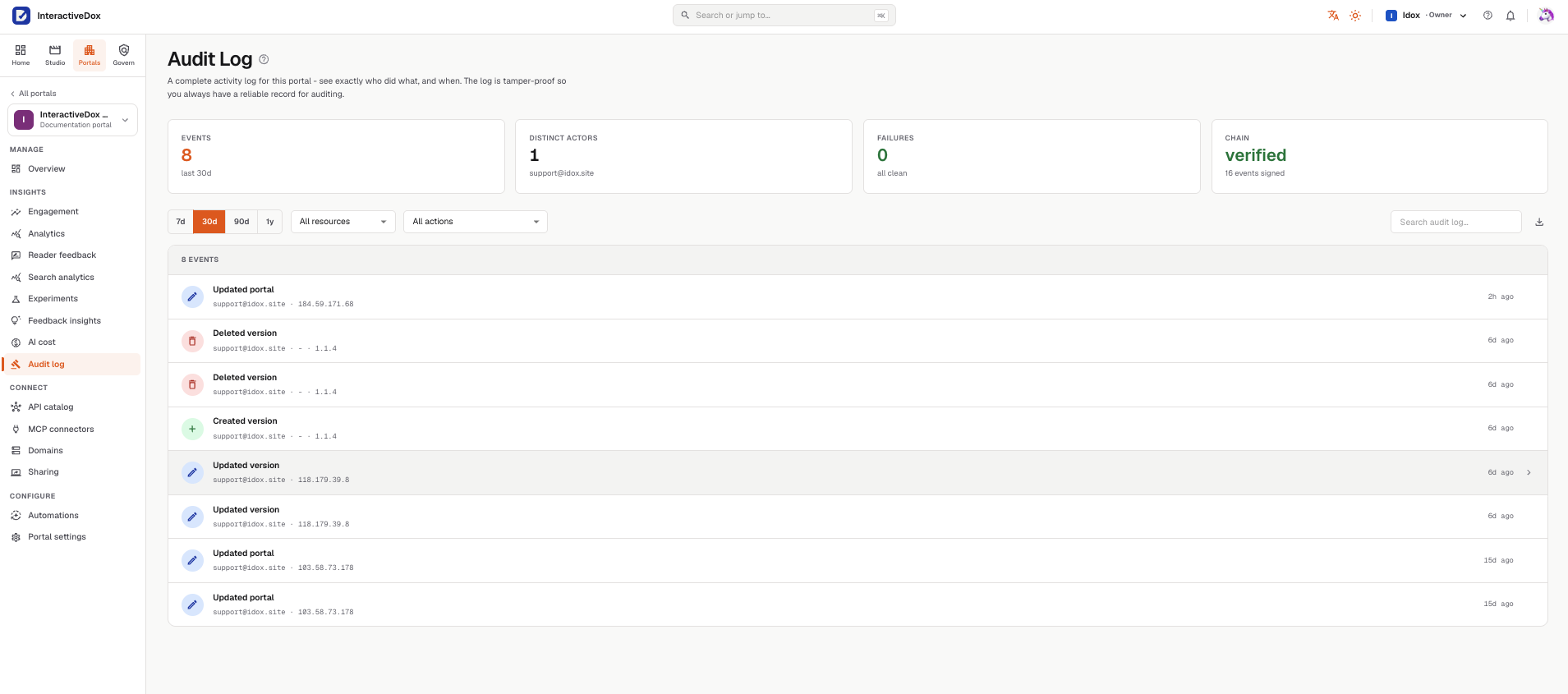
Every important event for the portal, who did it and from where, with the hash chain verified across all signed events.
Where do sensitive operations run?
Sensitive verification can run where your systems already live.
For supported guides, Run Now executes from the author's own machine through the desktop app. Scheduled verification runs through an agent you host, which registers, heartbeats and claims runs from your side of the network. Private systems do not need to be reachable from the public internet for supported procedures to be verified.
Credentials used for verification are kept in the operating system's keychain on the machine that runs it (macOS Keychain, Windows DPAPI, Linux libsecret) and the store fails closed with no plaintext fallback. Anything typed into a secure or unknown field is dropped before step data leaves the machine, and known secret formats are redacted. What comes back to the platform is the run result: step events and step screenshots, so a reviewer can see what happened.
This is local execution of verification, not an on-premises deployment of the platform. The two are different, and we keep them separate.
Interactive Dox
schedules the run
Your machine / your agent
- credentials · OS keychain, fails closed
- typed secrets · masked before upload
- result + step screenshots · return
Your private systems
not exposed publicly
What happens when AI is involved?
AI should not inherit more authority than the task requires.
Keep agent roles bounded, deterministic system actions explicit, and human approvals visible where required. AI output starts as a draft; a person decides what becomes official through the same review and approval flow.
AI provider calls involve external processing; which provider receives what, under which key, is part of the security review. How AI fits into workflows: AI & Agents.
Whose key is used?
Supported agent-gateway operations can use provider credentials configured for your workspace, and a workspace can require its own key so no platform key is ever used for those operations.
Can our own agents connect?
Access for your own AI agents is a controlled interface: it can be switched off, limited to allowed tools, rate-limited per caller, and protected portals require a workspace API key.
Can AI make something official?
AI output starts as a draft; a person decides what becomes official through the same review and approval flow.
Security questions, answered.
Do AI agents get unlimited access?
No. In a configured workflow each step is assigned to a person, an AI agent or a system, and human approvals stay explicit where the process requires them. Access for your own AI tools can be switched off, limited to allowed tools, rate-limited per caller, and requires a workspace API key for protected portals.
Where does verification execute?
For supported guides, Run Now executes from the author's own machine through the desktop app, and scheduled verification runs through an agent you host. Your private systems do not need to be reachable from the public internet.
Does Interactive Dox hold our production credentials?
Credentials used for verification are kept in the operating system's keychain on the machine that runs it, and anything typed into a secure field is masked before step data leaves that machine. If you choose to store adapter credentials in the workspace for a hosted agent, they are encrypted with AES-256-GCM at rest.
What comes back to the platform after a run?
The run result: step events and step screenshots, so a reviewer can see what happened. Typed secrets are dropped before upload, and known secret formats are redacted.
Can an AI agent change something official?
No. AI output starts as a draft. Publishing goes through the same server-enforced approval gate as any human change, and a person makes it current.
Do you support SAML or SCIM?
Not today. The workspace app signs in with Google or GitHub; reader portals can delegate sign-in to your identity system through OAuth 2.0 or signed JWTs; membership is managed in the admin app or through the API. If your identity program requires SAML or SCIM, talk to us.
Which certifications do you hold?
None yet. We publish the controls a reviewer can test rather than badges we can't back, and we'll share the audit roadmap in a security review.
What can security teams review before deployment?
The access model, approval workflow configuration, audit and sealing behaviour, the verification architecture and credential boundaries, AI provider and key handling, and proof-of-concept scope, before any rollout.
Automation with clear boundaries. Review security with us.
Walk through the access model, approval configuration, audit behaviour, verification architecture, and AI key handling before any rollout.
Review security with us.
Leave your work email and we'll follow up to arrange a security review for your workflows.