From SOPs to efficient,audit-ready business processes.
Interactive Dox governs the approved way work gets done. It keeps the approved process current, makes it available to people and AI, and lets it run across people, role-bound AI agents, and systems, using AI where it adds value and simpler tools where they fit.
Workflow automation. Efficient AI use. Clear accountability.
- Verify & Keep CurrentCheck supported procedures against real systems, detect drift, and keep the latest approved knowledge aligned with reality.Explore
- Governance & ComplianceControl versions, reviews, approvals, signatures, frameworks, and evidence so people and AI know what is trusted.Explore
- AI & AgentsMake approved, current operational knowledge available to your AI tools and agents without creating a second source of truth.Explore
- Insights & FeedbackSee what people are finding, using, asking, and improving so your knowledge gets stronger over time.Explore
- Integrations & APIConnect the same governed knowledge to the tools, workflows, portals, and AI your organization already uses.Explore
Document Studio
Capture and create trusted operational knowledge from real work.
Browser capture, desktop capture, authored procedures, training, video, and structured documents all start here.
Explore Document Studio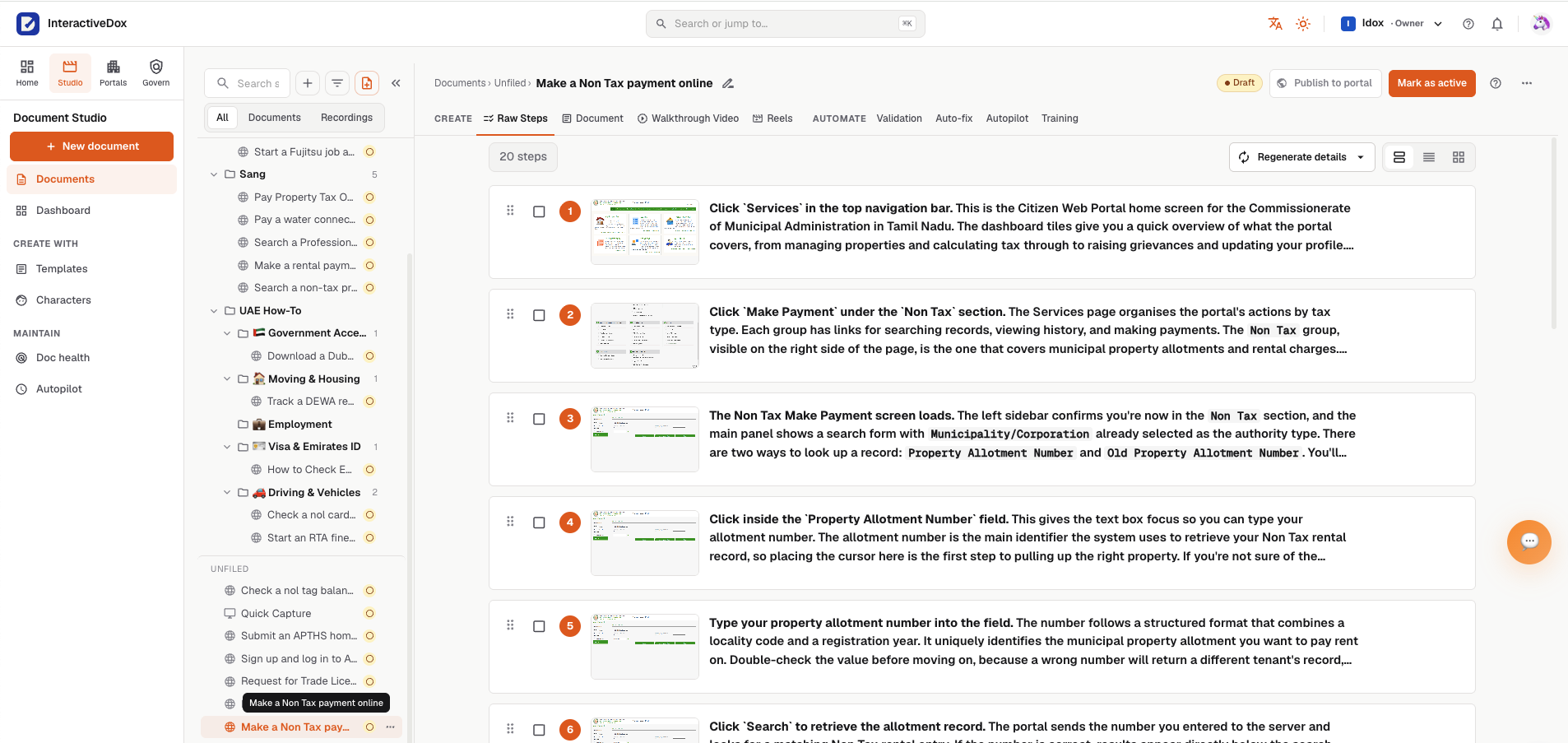
Knowledge Portals
Publish and deliver governed knowledge to employees, customers, and AI.
Searchable portals, AI answers, branded delivery, and current approved knowledge all flow from the same source.
Explore Knowledge Portals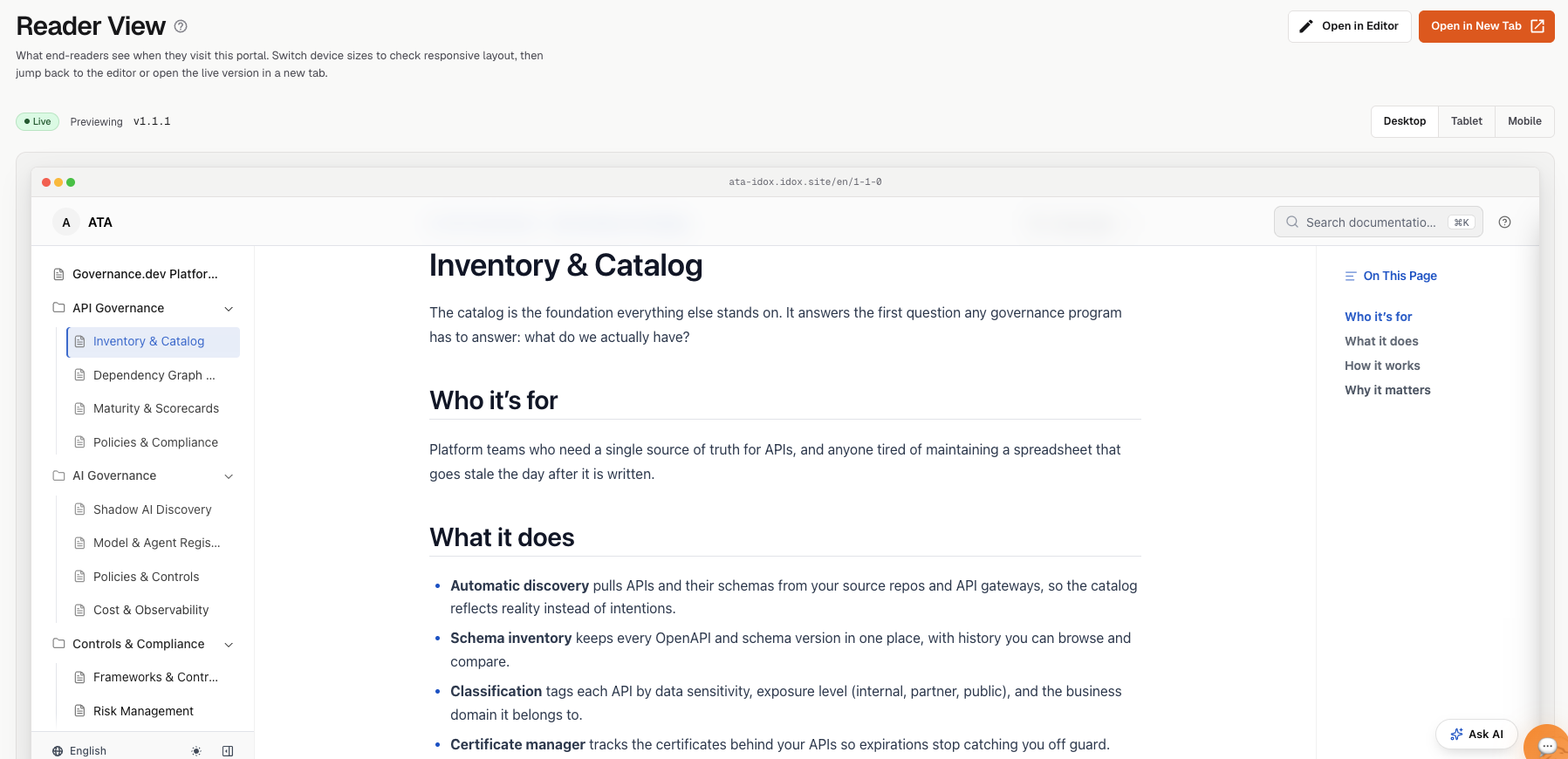
Document Studio
Capture and create trusted operational knowledge from real work.
Browser capture, desktop capture, authored procedures, training, video, and structured documents all start here.
Explore Document StudioKnowledge Portals
Publish and deliver governed knowledge to employees, customers, and AI.
Searchable portals, AI answers, branded delivery, and current approved knowledge all flow from the same source.
Explore Knowledge PortalsOne platform layer across both products
- Verify & Keep CurrentCheck supported procedures against real systems, detect drift, and keep the latest approved knowledge aligned with reality.
- Governance & ComplianceControl versions, reviews, approvals, signatures, frameworks, and evidence so people and AI know what is trusted.
- AI & AgentsMake approved, current operational knowledge available to your AI tools and agents without creating a second source of truth.
- Insights & FeedbackSee what people are finding, using, asking, and improving so your knowledge gets stronger over time.
- Integrations & APIConnect the same governed knowledge to the tools, workflows, portals, and AI your organization already uses.
One process. The right people, AI, and software for each step.
Start with the SOP, review how each task should run, and put the agreed workflow into action, with ownership, approvals, and execution records connected to the process.
SOP
Start with the procedure, its tasks, roles, and business rules.
Review
Review suggested assignments and opportunities to use AI, scripts, APIs, or existing tools.
Approve
Confirm the workflow and required controls before putting changes into use.
Execute
Run configured steps across people, AI agents, and systems, including human checkpoints where required.
Track
See progress, exceptions, approvals, and the records of what happened.
Proposed improvement
goes back to Review before anything changes in the workflow
Which approvals a workflow needs depends on how it is configured. People can also approve decisions while a workflow runs.
- The procedure and its tasks
- Roles and business rules
- Required approvals
- Peopleapproved
Review · Approve · Handle exceptions
- AI agentsexception flagged
Interpret · Analyze · Recommend
- Systemscompleted
Extract fields · Run scripts · Call APIs · Send notifications
↺ Propose an improvement → Review → Approve → Use the approved workflow
Use AI where it adds value.Not simply because it is available.
Interactive Dox helps teams review workflow steps and suggests where a script, an API, or an existing utility could be a better fit than AI. Your team chooses what runs, keeping AI for the tasks that benefit from it and avoiding unnecessary model usage.
Make the process more efficient, not just more AI-powered.
Where suitable structured data already exists in an authorized source, consider retrieving it directly instead of extracting it again.
- Workflow step
- Extract an invoice number, date, and total from a supported text-based PDF.
- Suggestion
- Use a document-extraction utility and field checks for routine extraction. Involve AI when interpretation is needed.
- Why consider it?
- Avoid an unnecessary model call for this step.
- Who chooses?
- Your team reviews the suggestion before changing the workflow.
- Routine extractionextraction utility · field checks
- Needs interpretationAI agent
- Still unresolveda person reviews
Better execution. Lower operating costs. Evidence when you need it.
Lower operating costs
Reduce unnecessary AI usage and repetitive coordination. Choose practical ways to run and maintain each step.
Faster execution
Move work through defined steps and handoffs, with clear ownership when a person needs to act.
Greater efficiency
Coordinate people, agents, and systems in one workflow, with visibility into progress and exceptions.
Audit readiness
Keep procedure versions, approvals, and execution records connected, reducing the effort of gathering evidence later.
Know what ran, who approved it, and what needs attention.
Connect the procedure with its execution records and required approvals. Give teams a clearer history to review during day-to-day operations and when preparing for an audit.
Audit recordIllustrative workflow
Vendor onboarding · run 142
- Procedure followed
- SOP-114 · Vendor onboarding · revision 4
- Document approval
- J. Alvarez · signed · Sep 2
- Workflow run
- run 142 · 4 steps completed
- Required decision
- exception approved · finance lead · 10:42
recorded as the work progressed
- 10:31systemvendor details retrieved
- 10:33AI agentunusual response flagged · suggestion drafted
- 10:42finance leadexception approved
- 10:43systemvendor record created · confirmation sent
- 10:43systemrun recorded against revision 4
Improve the process without losing control of it.
Review suggested changes before adopting them. Keep the approved process and its history visible as the business evolves.
- Execution
- Performing the configured business process.
- Verification
- Checking whether a supported documented procedure still works against its target system.
Neither a completed task nor an approved document proves compliance on its own.
Built on a foundation of ownership and control.
Your data stays yours
Each workspace's knowledge remains isolated and controlled.
Only the right people
Permissions determine who can see, change, approve, and publish.
Nothing locked in
Your content keeps its history and can be exported in open formats.
A record you can stand behind
Reviews, approvals, versions, and audit evidence show what changed and who approved it.
AI on your terms
Use your preferred AI tools and keys while keeping your governed knowledge under your control.
the detail your security reviewer will ask for is on the Security page
The knowledge behind the work stays part of the process.
Connect workflow execution with the SOPs, guides, videos, training, and knowledge portals your teams use to understand the work.
SOPs · guides · video · training
Document Studiocreated from how the work is actually done
Knowledge portals · AI answers
Knowledge Portalsto employees, customers, and AI
Verify & keep current
Verificationchecks supported procedures against the systems they describe
Connect to your AI, via MCP, API, and integrations.
Platform questions, answered.
What is Interactive Dox?
Interactive Dox governs the approved way work gets done. It keeps that process current, makes the approved version available to people and AI, and lets it run across people, role-bound AI agents, and systems. There are two level-one outcomes from the same governed process: keeping it current as requirements and real work change, with every proposed revision reviewed and approved before it becomes current; and putting the approved process into action, where a person makes accountable decisions, a role-bound AI agent interprets and recommends within guidelines its owner wrote, and systems do the deterministic work.
Does every step use AI?
No. A configured workflow can include people, AI agents, scripts, APIs, and existing tools. Interactive Dox suggests where AI is useful and where another approach may be more suitable. Your team chooses what runs.
How does this help with costs and audits?
It helps teams avoid unnecessary AI work, reduce coordination effort, and keep approvals and execution records connected to the process. Actual savings and audit requirements depend on the workflow and how it is configured and used.
Does every change require approval?
No. Approval behavior depends on the workflow and configuration. Where approval is required, Interactive Dox keeps the review, decision, version, and evidence together.
Bring us one SOP. Let's find a better way to run it.
Explore workflow automation, efficient AI use, and the evidence your team needs to stay accountable.
Book a demo around one real SOP.
Leave your work email and we'll follow up to arrange a demo built around one of your procedures.