Don't use AI just because you can.
Interactive Dox helps teams use AI for reasoning and judgment-heavy work while suggesting simpler software, scripts, APIs, or utilities for deterministic steps.
Less unnecessary AI. More predictable execution. Better control over operating cost.
Every task does not need an agent.
Interactive Dox can analyze the workflow and suggest where a deterministic method may be more appropriate than consuming AI for the same step. The team remains in control of the workflow design.
People
Best for
- Approvals
- Accountable decisions
- Exceptions
- Judgment
- Sensitive escalation
AI agents
Best for
- Interpreting unstructured information
- Reasoning
- Research
- Summarization
- Recommendations
- Drafting
Software
Best for
- Parsing
- Calculations
- Structured extraction
- APIs
- Database operations
- File movement
- Notifications
- Deterministic rules
Example: “Read this PDF and extract these fields.”
Path A · AI everywhere
- PDFinput
- Send the full content to a modelAI
- Ask the model to find the fieldsAI
- Repeat on every runAI
model inference on every run
Path B · Efficient workflow
- PDFinput
- Extract with a parser or document toolingsoftware
- Known fields foundsoftware
- AI only if interpretation is actually requiredAI, if needed
AI reserved for content that needs understanding
Use software for extraction when the task is deterministic. Bring in AI when the content requires understanding.
Not every PDF can be handled without AI. The right approach depends on the document's structure, quality, and type, and on how much interpretation the fields need. Your team reviews any suggestion before the workflow changes.
Agents get a job, not unlimited authority.
Give each agent a defined role, task, and boundary inside the workflow. Deterministic system actions remain explicit rather than being hidden inside an autonomous agent. A role can include approving: a review step that routes to a person can route to a named agent instead, which judges against guidelines its owner wrote, cites what it relied on, and hands the decision back to that owner when it is not confident.
Task → permitted executor → action → result → next step
- 1Assign the task to its permitted executorTaskassigned
- 2Summarize the supplier's reply and recommend follow-up questionsAI agent, role-boundrecommendation ready
- 3Decide whether to accept the recommendationPersonaccepted
- 4Update the supplier record with the accepted resultSystemcompleted
- 5Start the next configured stepSystemstarted
Records kept as the work progressesIllustrative workflow: a bounded agent step
Supplier reply review
- task assigned to its permitted executor
- summary and recommendation recorded
- decision recorded
- supplier record updated
- next step started
In this configuration the agent's role covers summarizing and recommending, so approval stays with a person and the system action runs as configured. An agent can also be given an approver role; see below.
Control the cost of AI at the process level.
AI cost is not only a model-selection problem. It is also a workflow-design problem. If a routine step can be completed reliably with code or an existing utility, it may not need model inference on every run.
No savings figure is implied. The effect depends on the workflow, its volume, and the setup, maintenance, and review each approach needs.
Your own AI tools can read the same approved knowledge.
Separately from the agents inside a configured workflow, the AI tools your team already uses, such as Claude, ChatGPT, Cursor, Copilot, or an agent you built, can connect to published portal knowledge through MCP on your own AI plan. Interactive Dox exposes the knowledge to those tools; it does not run them.
Quick start
There is nothing to install or run. Your workspace gives you a ready-to-use connection URL and setup snippets for each AI tool. Developers can still copy the technical configuration below when they need it.
Cursor
Add to ~/.cursor/mcp.json{
"mcpServers": {
"interactivedox-docs": {
"url": "https://agent-id.interactivedox.com/mcp/portal"
}
}
}Claude Code
One command in your terminalclaude mcp add --transport http interactivedox-docs \ https://agent-id.interactivedox.com/mcp/portal
Claude Desktop
Add to claude_desktop_config.json{
"mcpServers": {
"interactivedox-docs": {
"url": "https://agent-id.interactivedox.com/mcp/portal"
}
}
}ChatGPT
Settings, then Connectors, then Add MCP serverName: interactivedox-docs URL: https://agent-id.interactivedox.com/mcp/portal
From a portal to an answered question.
Step by step: share the portal with your AI tool, paste the connection details it gives you, and ask a question. The answer comes from your published documentation, with a link to every page it used.
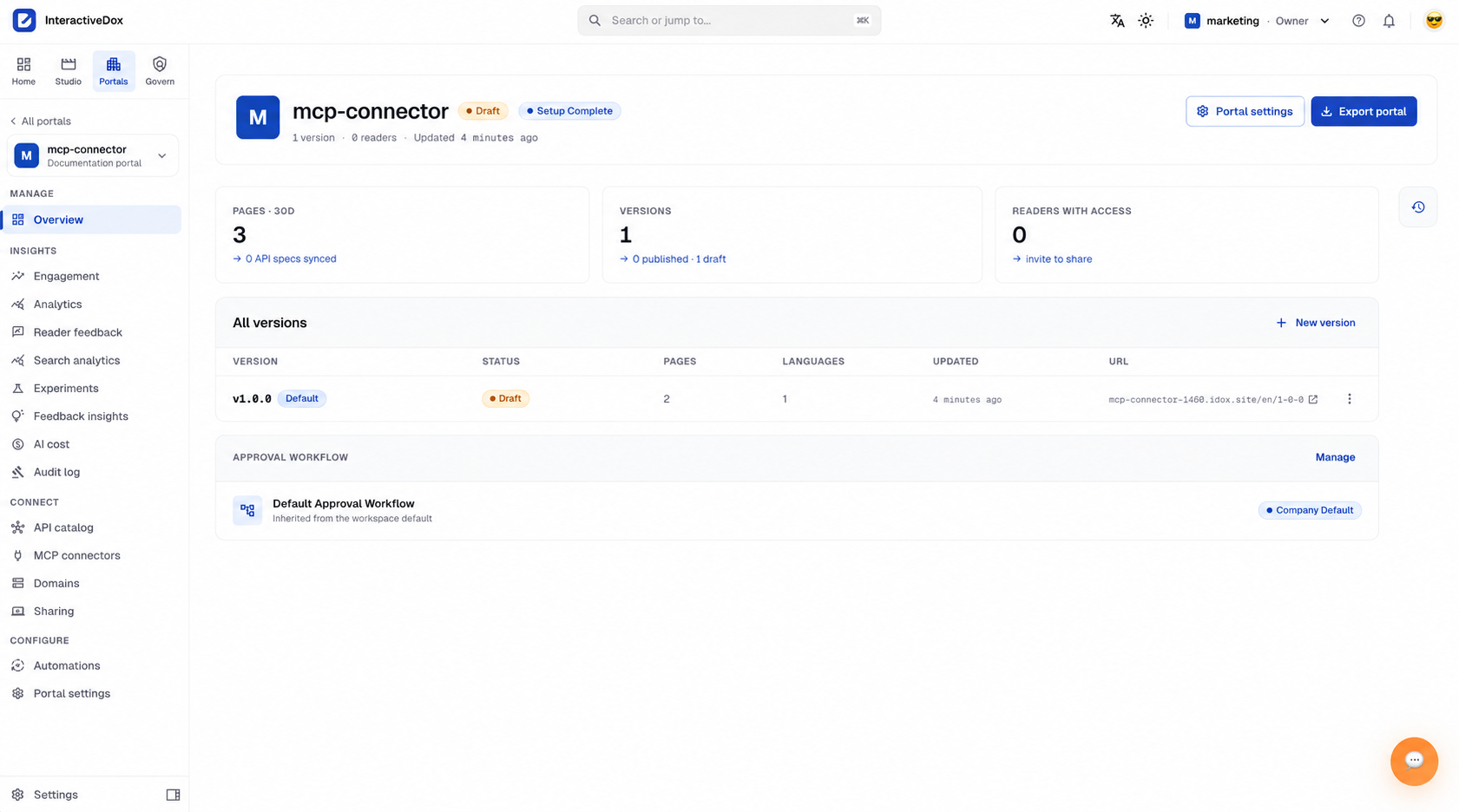
Start from a portal you already have: its pages, its versions, and the approval workflow it inherits.
Read and search, no key required
Anything a visitor to your published portal can read, an agent can read too.
portal_list_pagesPublicList a portal's navigation: every page, group and tab with slug, title, type and parent. The starting point for understanding a portal's structure.
portal_read_pagePublicRead one page's content and details.
portal_searchPublicSearch across one portal so an AI tool can find the right answer.
Edits follow the same review rules
Editing tools require a workspace API key, passed as Authorization: Bearer ata_…. Every edit is tracked in the portal's history, so AI changes can be reviewed and traced like team changes.
portal_create_pageAPI keyCreate a page, group, or tab in the portal.
portal_save_pageAPI keyUpdate one page's content and keep search current.
portal_update_nodeAPI keyUpdate page settings like title, icon, visibility, and description.
portal_move_nodeAPI keyMove, rename, or reorder a page in the portal.
portal_delete_pageAPI keyDelete a page while keeping the surrounding page tree organized.
AI & Agents questions, answered.
Does Interactive Dox decide on its own whether AI runs?
No. Interactive Dox suggests where AI is useful and where a script, API, or existing utility may be more appropriate. Your team reviews the suggestion and chooses how each step runs.
What can an agent do inside a workflow?
An agent works within a defined role, task, and boundary in a configured workflow. Depending on the role you give it, that can be summarizing and recommending, or approving as a named reviewer. Deterministic system actions stay explicit steps rather than being hidden inside the agent.
Can an AI agent approve something?
Yes, where your workspace configures it. A review step that routes to a person can route to a named agent instead, such as a legal, QA, or finance reviewer you define. Four things hold: the agent belongs to a named owner, so accountability does not move to the software; it judges against guidelines its owner wrote, not a general model opinion; its decision arrives with the reasons and sources it relied on, kept on the approval record; and low confidence hands the decision back to its owner rather than approving quietly. An owner can override any verdict, and a chain can be all people, all agents, or a mix, with the flow preview stating which before anything is submitted.
Will this cut our AI costs by a set amount?
No figure is promised. Avoiding unnecessary model calls can help control cost, but the effect depends on the workflow, its volume, and the setup, maintenance, and review each approach needs.
What is the Interactive Dox MCP server?
It is how the AI tools you already use get the same approved, current answers your people get, instead of guessing from old or scattered sources. MCP is the industry standard behind the connection; your engineers will recognise it.
Do read tools require an API key?
Reading what your published portal shows needs no key. Making changes does, and every change is tracked and reviewed like a person's.
Can agents update documentation through MCP?
Only if you allow it. Their proposed changes go through the same review as anyone else's before they become current.
Which clients can connect?
Cursor, Claude, ChatGPT, Copilot, your own agents and internal support bots.
AI for reasoning. Software for certainty. People for judgment.
Bring one workflow and see which steps need a person, which need AI, and which software can handle reliably.
Book a demo around one real SOP.
Leave your work email and we'll follow up to arrange a demo built around one of your procedures.