Create the SOP once. Put it to work across your business.
Turn recorded work into SOPs, guides, narrated videos, and training. Reduce the cost of recreating the same process in different formats, and use the SOP as the starting point for workflow automation.
Less repeat authoring. Faster knowledge transfer. Better audit preparation.
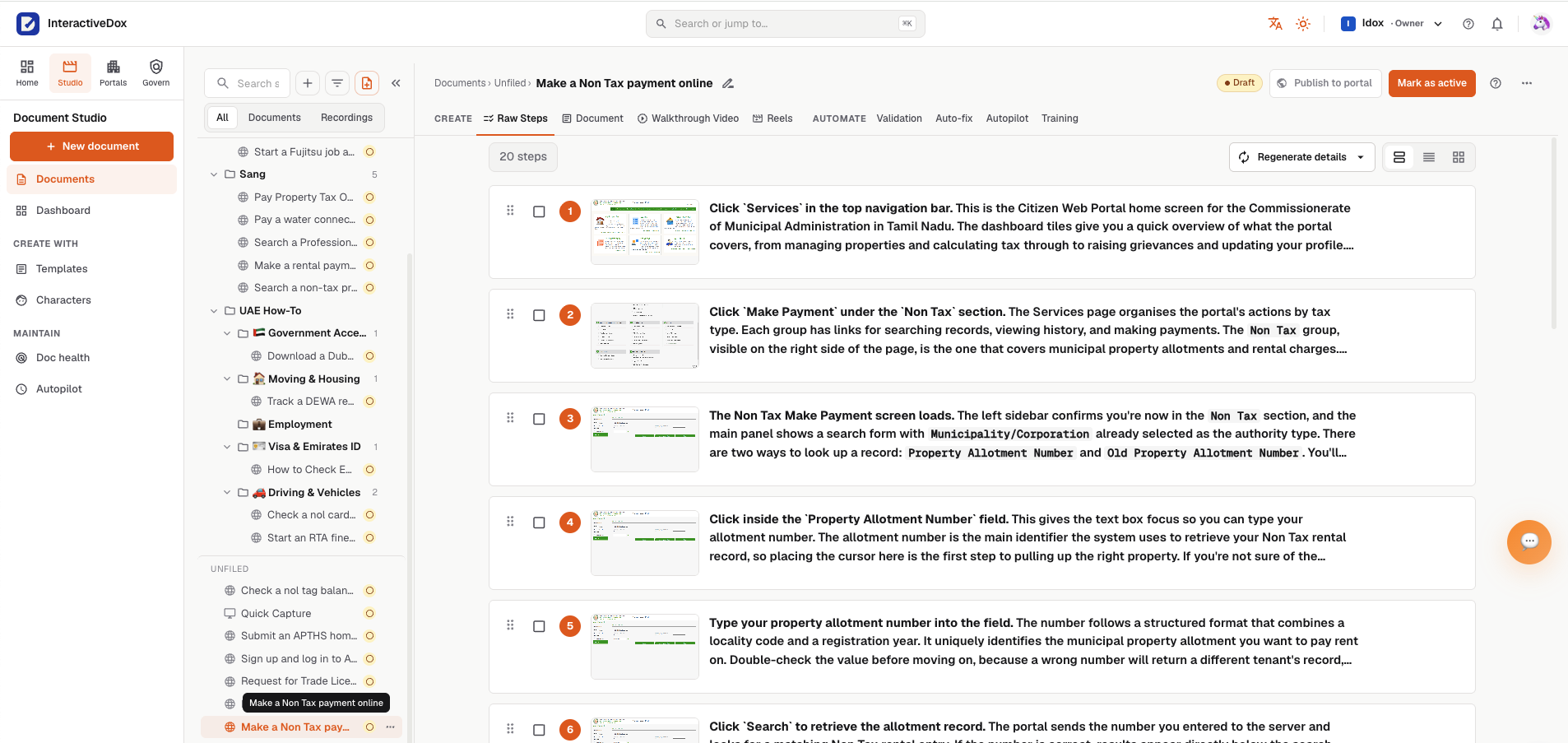
A captured workflow, “Make a Non Tax payment online”: every step with its screenshot and a written explanation.
One process should not mean four separate content projects.
Writing the SOP, recording the walkthrough, and building the training separately means repeating work. When the process changes, each version needs attention again. Document Studio gives teams a shared starting point, so they spend less effort recreating instructions and more time putting them to use.
Lower content-production costs
Reuse captured work across SOPs, guides, video, and training instead of starting from scratch for each format.
Faster onboarding and handovers
Give people a written guide, a narrated walkthrough, and training material built from the same process.
Less audit-preparation effort
Keep controlled procedure revisions and approval records available for review instead of piecing together the document history later.
From how work happens to how the business runs.
Capture or author the procedure, review it, and reuse it for documentation, learning, and the workflow your team needs to run.
- Capture work
- Import a procedure
- Author from a template
Reuse the procedure
- SOP / Guideready to publish
- Narrated videoready to publish
- Trainingready to publish
Review and publish each output as appropriate
Prepare the workflowready to configure
- Review tasks and roles
- PeopleAI agentsSystems
- Required approvals
Capture or create
Record a supported browser or desktop process, import a procedure through a supported path, or start from a template.
SOP draft
Turn the source into clear, structured instructions.
Review
Check the steps, refine the content, and confirm the procedure.
Reuse
Create related guides, narrated videos, and training for the people who need them.
Workflow handoff
Use the SOP to define tasks, roles, and controls for execution in Interactive Dox.
Start with the work, not a blank page.
Record a procedure in the browser or across desktop applications, then turn the captured steps into an editable guide or SOP. Already have the procedure? Use the supported import or authoring options to bring it into the same workspace.
Spend less time reconstructing steps and more time reviewing what matters.
Recording a process captures its steps for documentation. It does not mean every recorded action can be replayed automatically.
- Browser captureChrome extension
- Desktop capturedesktop app for macOS and Windows
- Importsupported paths for existing procedures
- Authortemplates, building blocks, and AI-assisted drafts
One source. More ways to teach the process.
Build the SOP, narrated walkthrough, and training from the same captured work. Edit and review each output for its audience without starting the explanation over every time.
SOP-031 · Month-end close
rev 4 · supersedes rev 3Purpose
Procedure
- 1Lock the ledger period
- 2Reconcile bank accounts
- 3Post accruals
approved · signature-backed · sealed
SOPs and guides
Structured instructions that teams can review, revise, and share.
The SOP is also the starting point for a workflow in Interactive Dox.
Learn more- 01:24
“Next, open Settings and choose the billing account…”
Narrated video
Editable walkthroughs with narration and supported languages.
Built from the same captured steps as the SOP.
Learn more - Lesson 3 of 6
Which step needs approval?
SCORM → LMS- Lock the period
- Post accruals
- Reconcile accounts
score 8 / 10 · passed
Training
Lessons and assessments based on the procedure, with supported delivery to your learning system.
Delivered to your existing LMS through SCORM. Document Studio is not an LMS.
Learn more - Northwind Helppayment method
- Getting started
- Billing
- Security
- Integrations
Update your payment method
Knowledge portals
Publish approved guidance through your existing supported portal workflow.
See how publishing works in Knowledge Portals.
Learn more
A clearer record before the auditor asks.
Give controlled SOPs a revision history and route publication through the configured review process. Keep approval decisions and signature records where required, so teams can show what was reviewed and approved.
Less time reconstructing document history. More confidence in the procedure your team is using.
A document approval shows that a revision was approved. It is not proof that the work was performed; execution records in the platform are a separate part of the audit story.
Revision historyIllustrative process
SOP-031 · Month-end close
- Draftrevision 5 drafted from revision 4
- In reviewtwo reviewers assigned · comments resolved
- Approved revisionapproved and signed · Sep 9
- Publishedrevision 5 is the current version
Approval steps apply where a review process is configured for the document.
The SOP is the starting point, not the finish line.
Use the SOP to prepare a workflow across people, AI agents, and systems. Interactive Dox suggests where AI adds value and where a script, API, or existing utility may be a better fit. Your team reviews the suggestions and chooses how the work runs.
Faster execution, less unnecessary AI usage, and better control of the cost of running the process.
Example: extracting invoice fields.
A supported document-extraction utility may retrieve the invoice number, date, and total without a generative AI call. Interactive Dox can suggest that approach, reserving AI for interpretation when needed. Your team chooses the method.
Scanned documents, difficult layouts, and ambiguous content can need other extraction methods or review.
Keep the procedure useful as the work changes.
Revise the SOP as the process evolves, review proposed changes, and publish the approved version. For supported procedures, use Interactive Dox validation to check whether the documented steps still work and review the results.
Validating a procedure checks whether its documented steps still work. It is not the same as running a business workflow, and each video, translation, or training package keeps its own review and publishing step.
The specifics, stated plainly.
Authoring
- SOPs, guides and portal pages, written once
- Real-time co-editing with live cursors
- Your own templates, so every document looks like yours
- Snippets, glossary, and page templates
- AI-assisted drafts on our keys or your own
Video & training
- Video capture with webcam and Smart Blur
- Characters and narration for walkthroughs
- Training courses with quizzes
- Exports to your learning system
In & out
- Git-native content: every save a commit
- Bring in what you already have from GitBook, Notion, Confluence or GitHub
- Take anything out as PDF, Word, HTML, or back to Confluence and Notion
- API reference pages with a try-it playground
Document Studio questions, answered.
What is Document Studio?
Document Studio is the capture and authoring workspace in Interactive Dox. It turns recorded work into SOPs, guides, narrated videos, and training, the process knowledge behind workflow automation.
How does Document Studio connect to workflow automation?
The SOP provides the procedure, tasks, and roles. In Interactive Dox, teams review how those steps should run across people, AI agents, and systems before putting the configured workflow into use.
Do we have to use AI for every step?
No. Interactive Dox suggests where AI is useful and where code or an existing tool may be more suitable. Your team chooses the approach. The aim is efficient execution, not adding AI to every task.
How does it support audit readiness?
Controlled revisions, configured approval workflows, and retained decisions help teams explain which procedure was approved and how it changed. Execution records in the broader platform provide a separate record of the work performed. These controls support audit preparation; they do not guarantee compliance or an audit outcome.
Can we create video and training from the same procedure?
Yes. Use the captured work to create an editable narrated video and training material alongside the SOP. Review each output before sharing or publishing it, and use supported learning-system delivery for training.
Bring one process. See how far it can go.
See how one procedure can support SOPs, video, training, and workflow automation, with less repeat work and more control.
Book a demo around one real SOP.
Leave your work email and we'll follow up to arrange a demo built around one of your procedures.