Less repeat support
Give people a place to search for answers before asking someone to explain the same steps again.
Publish SOPs, guides, video, and API documentation in a branded portal with search and AI-assisted answers. Reduce repeated explanations and connect the knowledge your teams use to workflow automation across Interactive Dox.
Fewer repeated questions. Faster access to guidance. Controlled publication.
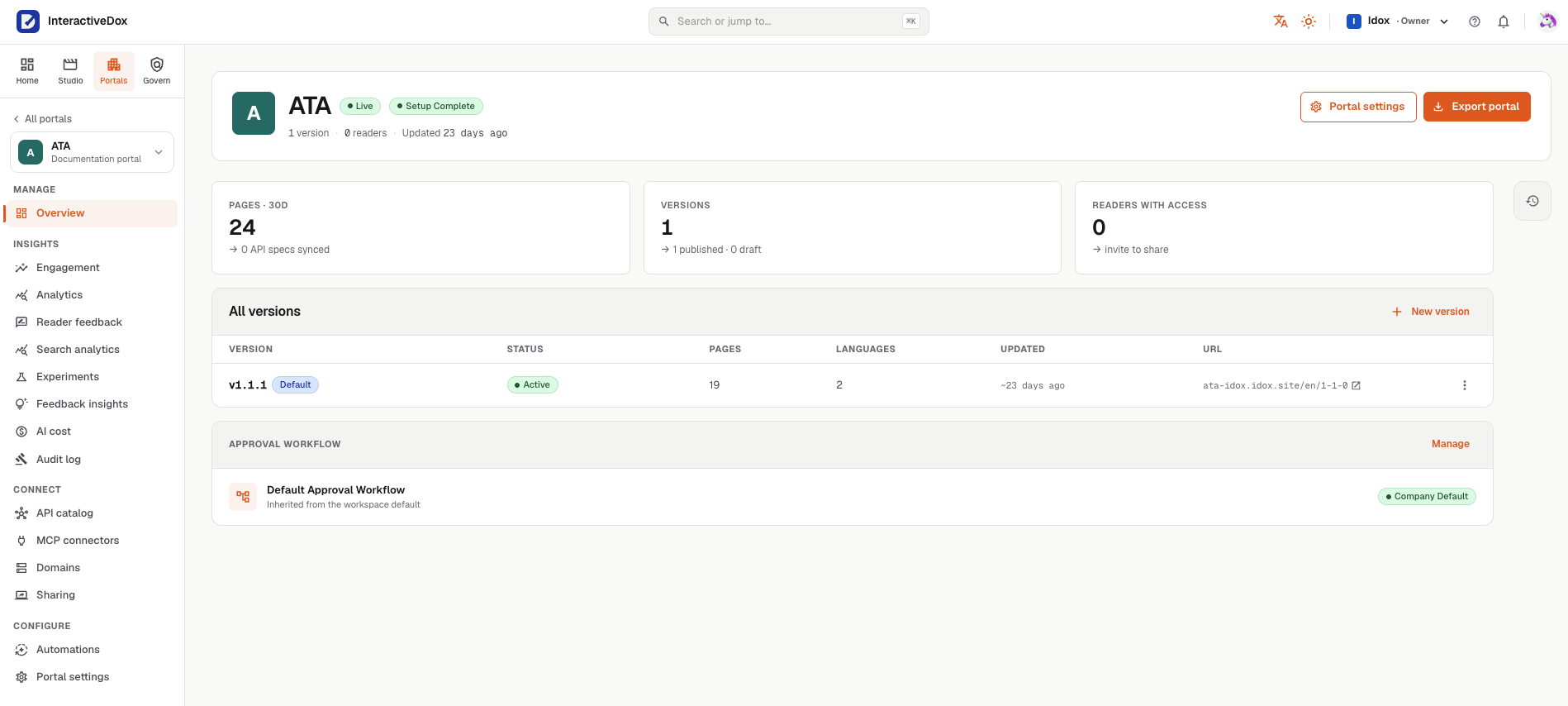
One portal at a glance: status, pages, versions, languages, readers, and the approval workflow it inherits.
When people cannot find the right instructions, another teammate has to explain the process again. Bring useful guidance into a shared portal, so routine questions do not always become another interruption or support request.
Give people a place to search for answers before asking someone to explain the same steps again.
Make procedures, walkthroughs, and reference material easier to find and use.
Keep versions and configured review decisions available, reducing the effort of reconstructing how guidance changed.
Bring the procedure, explanation, and supporting reference together. Give each audience a practical way to find what it needs, then connect that knowledge to the process being run.
Bring SOPs, guides, video, and API reference into the portal.
Review and publish each version as configured for that portal.
Readers browse or search and open the guidance directly, with no AI step.
Readers who ask a question get an AI-assisted answer that links back to its source pages.
People and connected agents use the same published guidance.
Configured workflows in the broader platform put that knowledge to use.
Bring written instructions, narrated walkthroughs, and reference pages into the same branded experience. Let readers choose the explanation that helps them move forward.
Let readers browse, search, or ask a question. AI-assisted answers include source references, so readers can open the underlying guidance rather than relying on an isolated response.
Manage versions and route publication through the configured review process. Give authors a clear way to update guidance while keeping a history of what changed.
Keep API reference and interactive request examples alongside the guides that explain how to use them.
Source references help readers check an answer. They do not guarantee it is correct or make it an approved policy decision.
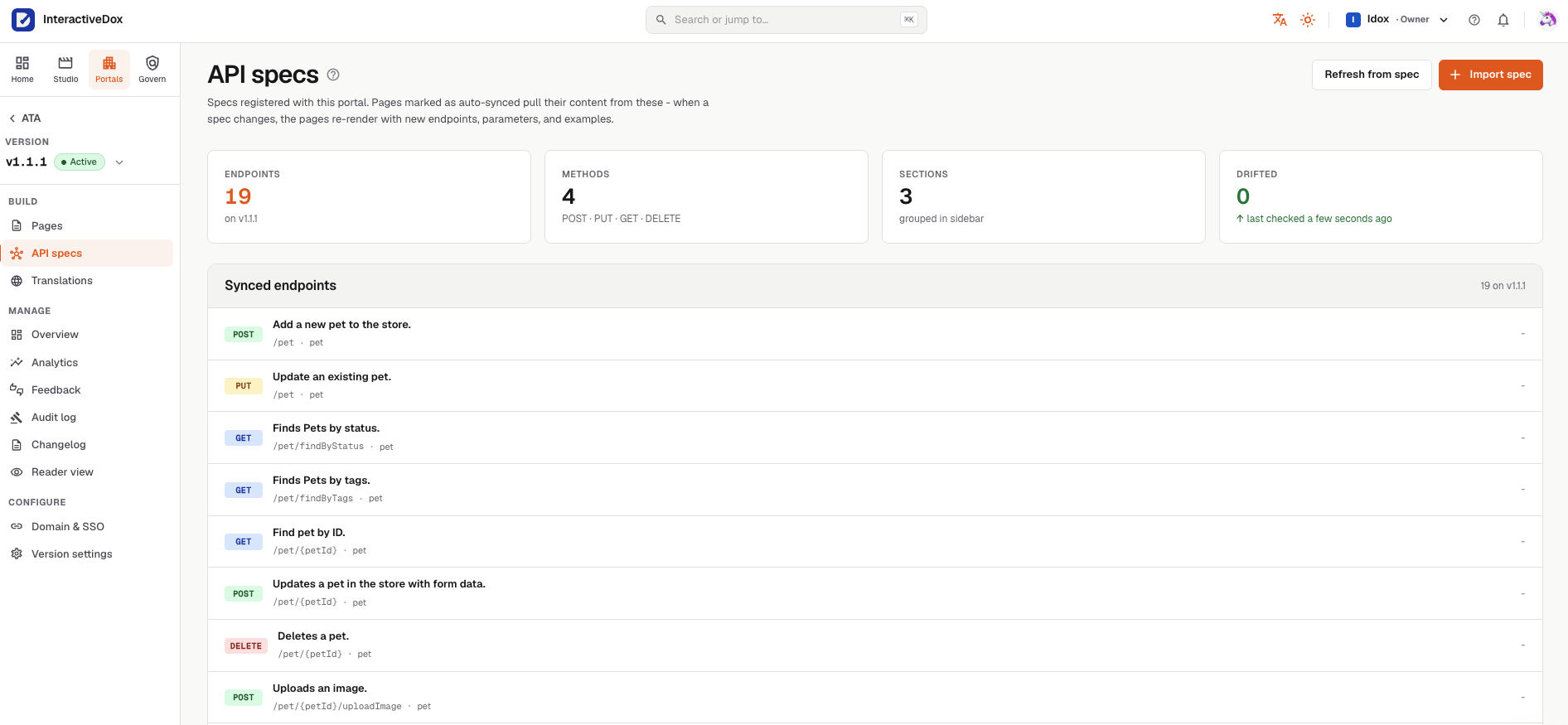
Every portal has a place for API specs. Register one, and the pages that follow it are rendered from the spec itself rather than copied by hand.
01
Import a spec
Register an OpenAPI spec with a portal version. Its endpoints, methods and sections are read from the spec.
02
Pages that follow the spec
Pages marked as auto-synced pull their content from the spec; when it changes, they re-render with the new endpoints, parameters and examples.
03
Drift, checked
The portal reports how many synced pages have drifted from the spec, and when it last checked.
SOPs give people and agents the context for the work. In the broader platform, Interactive Dox connects those procedures to workflow automation and suggests where AI, code, or existing tools fit best. Your team reviews the choices before changing how the process runs.
Less repeated explanation. Less unnecessary AI processing. Better control over the cost of getting work done.
Need a known reference field?
Consider a direct lookup from an authorized source. Use AI when the task needs interpretation, rather than sending every retrieval through a model.
An illustration of choosing how a workflow step runs in the platform, not a portal screen.
Knowledge Portals are the publishing and access experience in Interactive Dox. They bring SOPs, guides, media, and supported API reference into branded documentation with search and AI-assisted answers.
They provide the knowledge people and connected agents use. Workflow execution happens through the configured workflows in Interactive Dox, with the relevant permissions and human checkpoints.
Versions and configured publication approvals help establish the history of guidance. Execution records belong to the workflow and provide a separate record of the work performed. Neither an answer nor a published page alone proves that a procedure was followed.
See how your SOPs, guides, and reference material can support readers and the workflows behind your business.
Book a demo around one real SOP.
Leave your work email and we'll follow up to arrange a demo built around one of your procedures.